

Welch Allyn Connex Vital Signs Monitor

The medical surgical floor you’re used to is changing. With patients on your Med-Surg floor who are sicker than they used to be, you need a vital signs solution that can continuously monitor your patients, even when you can’t. The Welch Allyn Connex Vital Signs Monitor can help.
Explore this Product
Overview
Meet the Welch Allyn Connex Vital Signs Monitor
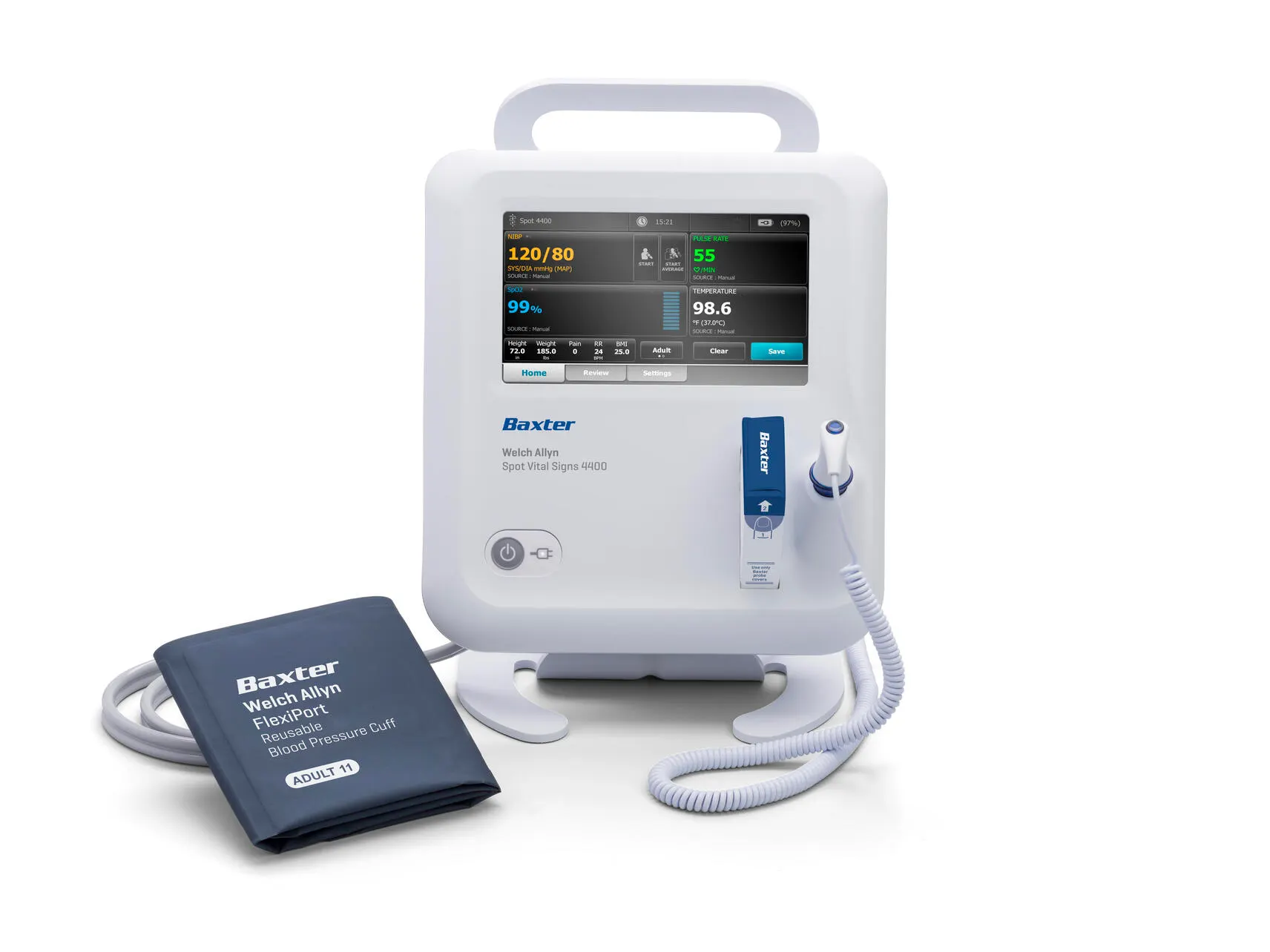
The Welch Allyn Connex Vital Signs Monitor has an intuitive touchscreen that is adaptable to most low-acuity healthcare environments and clinical workflows. It can track cardiac activity using three- or five-lead electrocardiograph monitoring, measure pulse oximetry, non-invasive blood pressure, temperature, end-tidal CO2 (EtCO2), respiration and more.


Streamlining Patient Care
Since no two patients are alike, multiple profiles support continuous vital signs monitoring, interval monitoring, spot check vitals and averaging so you can meet varying needs throughout your facility.
The wireless vital signs monitor provides EMR connectivity to give caregivers access to real-time patient information and helps reduce manual data entry errors. For high-risk patients, additional features like cardiac assessment, early warning scores and EtCO2 can help identify signs of patient deterioration.

The Data You Need When You Need It
Help eliminate manual data-entry errors and omissions with a fully automated, connected vital signs solution. Send data directly from the bedside to a patient’s chart in your EMR, so all caregivers in your organization can access the most up-to-date patient information.

Smarter, More Informed Clinical Decisions

Simple
Seamlessly transition from spot check to continuous monitoring

Secure
Securely access a device with one tap via Imprivata single sign-on

Connected
Efficiently send patient data to your EMR for improved accuracy

Continuous
Help detect patient deterioration sooner with continuous vital signs monitoring

FIPS Validated 140-2
Welch Allyn Connex Vital Signs Monitor 6500 Series have Federal Information Processing Standards (FIPS) 140‑2 Level 1 validation for their integrated radios
Features
Features
- Customize workflows to document patient observations and vitals modifiers
- Choose between SureTempPlus or BraunThermoScan®PRO 6000 Thermometry
- Help identify signs of patient deterioration with automated Early Warning Scores
- Capture pulse oximetry with Masimo or Nellcor SpO2 sensors
- Quickly and securely access a device with single sign-on (including RFID Scanner Imprivata integration)
- Use Medtronic MicrostreamTM Capnography (EtCO2) with Integrated Pulmonary Index (IPI)
- Connect to Detecto or Health o meter scales
- Take advantage of Masimo noninvasive continuous monitoring of total hemoglobin (SpHb) and Masimo Acoustic Respiratory Monitoring (RRa)
- Scale up with ECG monitoring to help identify lethal arrhythmia events and track cardiac activity using 3- or 5- lead ECG monitoring
- Integrate with Connex Central Stations to centralize monitoring and alarm management
- Secure patient information with data encryption and additional security features approved by the U.S. Department of Defense (DoD)
- Connect to your EMR via Wi-Fi or Ethernet
Monitor Ventilation with Capnography
When equipped with capnography, this continuous monitoring device monitors patient status 24/7 to help recognize respiratory distress and respond to signs of patient deterioration.
The Welch Allyn Connex Vital Signs Monitor with Medtronic MicrostreamTM Capnography (EtCO2) with Integrated Pulmonary Index (IPI):
- Enables continuous monitoring of CO2 at the airway
- Helps caregivers identify respiratory depression quickly
- Reflects change in ventilation within ten seconds
- Alarms when measurements go outside of safe thresholds
- Features a proprietary Integrated Pulmonary Index to help caregivers assess respiratory status

Tired of Entering Long Passwords?
Simplify your workflows with just a tap. The RFID scanner works with integrated Imprivata single sign-on. Just tap your badge and securely sign in to any device, no password needed.

Smart Device Connectivity
The Health of Your Patients Relies on the Health of Your Tech
Device downtime isn’t simply an inconvenience; it can stand in the way of patient care. Take control of the health and well-being of your connected devices with powerful access and insights from SmartCare Remote Management.
The simple-to-use, cloud-based solution helps you manage connected devices across your network so you can ensure your fleet is functioning at its finest. You can also proactively service, locate and update patient monitors to help reduce downtime and care disruptions.
Welch Allyn Connex Vital Signs Monitor Options & Specifications
Visit our U.S. Catalog for all available options and specifications for the Connex Vital Signs Monitor
| Available Options | |
|---|---|
| 68MCTP-B | SureBP NIBP, SureTemp Plus thermometry, Masimo SpO2, etCO2 continuous monitoring, printer, 802.11 wireless |
| 68MCTX-B | SureBP NIBP, SureTempPlus thermometry, Masimo SpO2, etCO2 continuous monitoring, 802.11 wireless |
| 68NCTP-B | SureBP NIBP, SureTempPlus thermometry, Nellcor SpO2, etCO2 continuous monitoring, printer, 802.11 wireless |
| 68NCTX-B | SureBP NIBP, SureTempPlus thermometry, Nellcor SpO2, etCO2 continuous monitoring, 802.11 wireless |
Welch Allyn Connex Vital Signs Monitor Parts & Accessories
For all available Connex Vital Sign Monitor parts and accessories visit our U.S. Catalog

Mobile Stand w/ Accessory Cable Management and Extended Housing for Connex Vital Signs Monitor 6000 Series
Item Number: 4900-60

GCX Wall Mount Bracket w/ Channel Adjustment and Extended Housing for Connex Vital Signs Monitor 6000 Series
Item Number: 4900-62

JADAK Barcode Scanner and Holster Kit
Item Number: 6000-916HS
Order & Support
Learn More About Welch Allyn Connex Vital Signs Monitor
Ordering and Support Information for Welch Allyn Connex Vital Signs Monitor
Get additional ordering, customer, technical, and medical support information for Welch Allyn Connex Vital Signs Monitor by contacting Baxter using the links below.

U.S. Catalog
To buy this product, purchase OEM parts and accessories, find a distributor, or look for options and specs please visit U.S. Catalog.

U.S. Support
For manuals and documentation, product training, technical support and services, submit repair and return requests or check order status for Hillrom, Allen Medical and Welch Allyn product please visit U.S. Support.

U.S. Edu
For medical information or non-promotional education about our products or therapies, please visit U.S. Edu.

Customer Account
For customers ordering our Hillrom and Welch Allyn products, you can still access personalized inventory tracking, media libraries, and order history. For all other needs, our U.S. Support site is always available to keep you moving forward.

Contact Us
To find contact details and assistance for Baxter products, report an adverse event or report a product complaint, or any other inquiries, please visit our contact us page.
Ready for More?
Complete this form to have a representative reach out.
Resources
All Resources for Welch Allyn Connex Vital Signs Monitor
Frequently Asked Questions
Does the WELCH ALLYN CONNEX Vital Signs Monitor have time intervals and alarm capabilities?
Yes, the Connex Vital Signs Monitor can acquire automatic, unattended, interval measurements. It can also be programmed to initiate interval measurements at variable interval periods for up to five hours. In addition, the device can be configured as a traditional spot-check device, which removes the interval and alarm functions from the user interface.
How many years or cycles can I expect a WELCH ALLYN CONNEX Vital Signs Monitor battery to last?
The manufacturer’s specifications estimate that the Connex Vital Signs Monitor battery will be at 70% of its original capacity after approximately 300 complete charge/discharge cycles.
Does Baxter have any mounting options for the WELCH ALLYN CONNEX Vital Signs Monitor bar code scanner?
Although Baxter does not sell mounting options for the bar code scanner used with the Connex Vital Signs Monitor, you may be able to find an appropriate scanner mounting option by contacting Jadak Technologies at www.jadaktech.com.
How do I know if the WELCH ALLYN CONNEX ProBP 3400, CONNEX Vital Signs Monitor, and CONNEX Integrated Wall System will work with my EMR or EHR?
Welch Allyn Connex vital signs devices are compatible with most of today’s EMR/EHR products. For details, request our Connected Partner List.
What Health o meter scales will work with my WELCH ALLYN connected device (SPOT VITAL SIGNS LXi, CONNEX Vital Signs Monitor or CONNEX Integrated Wall System)?
Baxter offers a number of Health o meter scales that are compatible with these Welch Allyn devices: Connex Vital Signs Monitor, Spot Vital Signs LXi and Connex Integrated Wall System. Contact your Baxter sales representative for more information.
Can I use bleach wipes or wipe solutions to wipe down the screen of the WELCH ALLYN CONNEX Vital Signs Monitor?
Yes, you can use wipes on the Connex Vital Signs Monitor touch screen surface as long as the bleach concentration does not exceed 10%.
When cleaning the device, avoid using cloths or solutions that include quaternary ammonium compounds (ammonium chlorides) or glutaraldehyde-based disinfectants.
The following agents are compatible with the monitor. Follow the cleaning agent manufacturer’s guidelines:
- 70% isopropyl alcohol: Wipe the monitor with a clean cloth slightly dampened with 70% isopropyl alcohol.
- 10% chlorine bleach solution:
- Wipe the monitor with a clean cloth slightly dampened with a 10 percent bleach and water solution. Follow the cleaning agent manufacturer’s guidelines.
- Rinse with a clean cloth slightly dampened with water that meets EP and USP quality standards.
- Allow the monitor surface to dry for a minimum of ten minutes before using the monitor.
Disinfect according to your facility’s protocols and standards or local regulations.
How do I access the Advanced Settings on my WELCH ALLYN CONNEX Vital Signs Monitor?
The Advanced tab provides password-protected access to the monitor’s Advanced settings for Admin mode, enabling nurse administrators, biomedical engineers and/or service engineers to configure specific features. The Advanced tab also presents read-only information about the monitor. (Note: You cannot enter the Advanced settings if sensors or physiological alarms are active or if vital sign measurements are displayed.)
To access the Advanced Settings:
- Touch the Settings tab
- Touch the Advanced tab
- Enter the Advanced settings code
- Touch OK, and the General Tab will appear.
Why doesn’t the printer print on my WELCH ALLYN CONNEX Vital Signs Monitor?
There are a few reasons why your printer is not working. Try these troubleshooting activities:
- If the reactive side of the thermal paper is not facing the print head, reverse the printer paper.
- If the thermal paper is wet, clean and dry the inside of the printer housing and replace the printer paper.
- If the printer module is not connected, check the internal USB and power harness connection.
- If the printer does not have power, check J17 on the main board.
- If the printer module does not function, replace the printer module.
- If the USB cable is defective, replace it.
- If the power harness is defective, test and replace it if necessary.
- If no printer error is logged, the main board may be defective. Check the error logs for printer errors. Replace the main board if necessary.
- If the printer fuse has blown, check MCE printer fuse F5. Replace the MCE PCBA.
Why can’t my WELCH ALLYN CONNEX Vital Signs Monitor communicate through the USB connection?
There could be a few reasons why your device cannot communicate via the USB cable. Try these troubleshooting activities:
- If the battery charge is low, connect the device to AC power and allow the battery to fully charge.
- If the communications board does not receive power, check the voltage from J49 on the main board for +5.0, ±5V DC. Replace the main board if necessary.
- If the USB client is defective, test the connection by connecting a PC running the service tool. Verify that the service tool is configured properly on the PC to communicate with the device. See the service tool Help files or replace the power cable to the communications board.
The display on my WELCH ALLYN CONNEX Vital Signs Monitor is dim when the unit is powered on. How do I adjust the brightness?
If the display on your device is dim when powered on, try these troubleshooting steps:
- If the brightness setting is too low, increase the Brightness setting. Touch the Settings tab, touch the Device tab, touch the Defaults and set the Display brightness to the desired level.
- If the display has reached the end of its useful life, replace the display.
How does the WELCH ALLYN CONNEX Vital Signs Monitor battery status “time indicator” work, and what does that number signify?
The battery status indicator displays the different states of the battery as represented by icons in the right corner of the Device Status area, including:
- The monitor is connected to a power outlet, and the battery is charging or is fully charged. The estimated charge rate is displayed as a percentage of capacity.
- The monitor is not connected to a power outlet and is running on battery power. The estimated charge time remaining is displayed in the hour(s), minute(s) format. Each section of the battery status indicator represents a percentage of remaining charge.
- The monitor is connected to a power outlet, but the battery does not maintain a charge or that feature has been removed.
- When the battery is not being recharged and power becomes low, a low-level alarm appears in the Device Status area.
Note: Observe the remaining battery charge in the battery status indicator and plug the monitor into a power outlet as soon as you are able.
If the low-level alarm is dismissed or if you take no action to charge the battery, a high-priority alarm appears when battery power is critically low. Plug the monitor into a power outlet immediately to prevent it from shutting down.
Why isn’t the touch screen on my WELCH ALLYN CONNEX Vital Signs Monitor responding?
If your device touchscreen is not working, try these troubleshooting activities:
- If there is a software error, reboot the device. Press and hold the Power button until the device shuts down then press the Power button to restart. (Note: Any configuration settings not saved as default will be lost.)
- If the touchscreen is out of calibration, recalibrate the screen. In Advanced settings, touch the Service tab then touch the Self-tests tab.
- If the touchscreen lock is activated, unlock the screen by touching the Lock icons at the bottom of the screen. To disable the touchscreen lock, touch the Settings tab, touch the Device tab and uncheck Allow display lock timeout.
- If there is a faulty internal connection, check the connection at J48 on the main board with display flex cable.
- If a display flex cable is broken, replace the touchscreen and display assembly.
- If the main board has a faulty touchscreen controller, replace the main board.
- If the touchscreen has experienced excessive force or prolonged rubbing I one area of the screen, replace the touchscreen.
Why doesn’t my WELCH ALLYN CONNEX Vital Signs Monitor power up?
If your Connex Vital Signs Monitor does not turn on, try these troubleshooting steps:
- If a new battery was installed, connect AC power to wake up the battery.
- If the AC power is disconnected, connect AC power.
- If the power cord is defective, replace the power cord.
- If the battery is discharged, charge the battery.
- If the power button is defective, replace the right-side panel and power button.
- If an internal connection is faulty …
- Check the power-flex cable connection at J6 on the main board.
- Check the AC power harness connections from the IEC connector to the power supply.
- Check the power harness from the power supply J2 to J30 on the main board.
- Check the battery power harness from J2 on the batter connector board to J29 on the main board.
- If the power supply is defective, check the output voltage on the power supply. The voltage should be 15 V ± 0.45 V DC. If it is not, replace the power supply.
- If the battery is defective, charge the battery for five hours. If the battery icon on the display still shows an empty battery symbol, replace the battery.
- If the main board is defective, replace the main board.
More Products
Explore More Products



Other Information
Disclaimers
Rx Only. For safe and proper use of product mentioned herein, please refer to the Operator’s Manual or Instructions for Use.
Baxter, Connex, Hillrom, SureTemp, and Welch Allyn are trademarks of Baxter International Inc.
Braun is a trademark of Braun, GmbH
ThermoScan is a trademark of Helen of Troy Limited.
Any other trademarks, product names or brand images appearing herein are the property of their respective owners.